

If you are using FD999 Game App and want to add funds to your account, understanding the deposit process is important before starting a transaction. A clear payment process can help users avoid common mistakes such as entering incorrect account details, sending the wrong amount, or losing a transaction reference.

For users in Pakistan, local payment services are often more convenient because they are familiar and easy to access. Depending on the current fd 99 platform, available payment methods include mobile wallets, bank transfer, or other supported options.
in this article guide explains the users FD999 Game deposit method step by step. It also covers payment verification, transaction records, common deposit problems, and important security precautions.
Important: Payment methods, limits, account requirements, and processing times can change. Always check the information displayed inside your current FD999 account before making a payment. For more information, visit now FD999 Game.
What Is the FD999 Game Deposit Method?
The FD999 Game deposit method is the process used to add funds to your FD999 account.
After logging into your account, you can normally find a Deposit, Wallet, Recharge, or similar option. From there, the platform display the payment methods currently available to your account.
The exact payment options can vary. For Pakistani users, local mobile wallets and bank-based payments may be convenient when they are supported.
Before making a deposit, check the available payment methods directly inside your account rather than relying on old screenshots or payment details shared on third-party websites.
FD999 Game Deposit Methods in Pakistan
FD999 provide different payment choices depending on the current version and payment system. The following are common types of payment methods that Pakistani users may encounter.
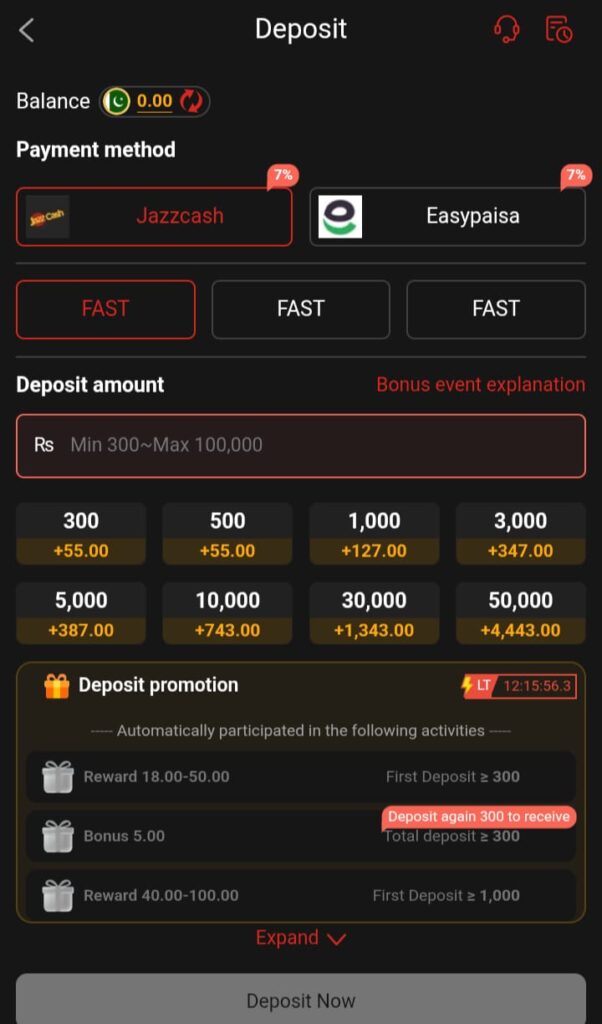
Jazz Cash
Jazz Cash is one of the widely used mobile payment services in Pakistan. If Jazz Cash is available in FD999 Game deposit method section, you can select it and follow the payment instructions displayed by the platform.
Before confirming a transaction, carefully check the recipient information and amount.
Do not send money to a Jazz Cash number received from an unknown person or an unofficial social media account.
Easy paisa
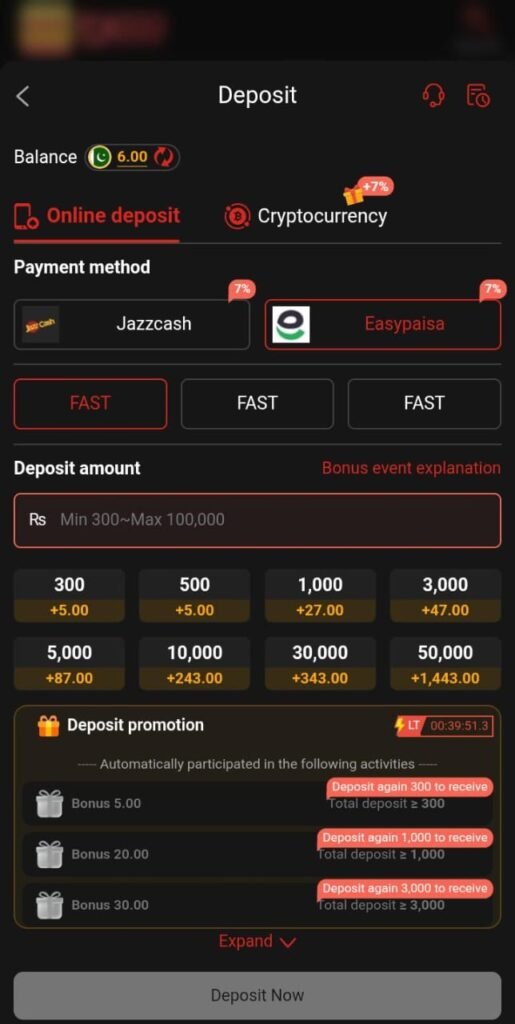
Easy paisa is another popular mobile wallet used for digital transactions in Pakistan.
If Easy paisa is displayed as an FD999 Game deposit method option, select it and follow the instructions provided on the payment page.
After completing the transaction, keep your payment reference or transaction ID. This can be useful if your account balance does not update immediately.
Bank Transfer
A bank transfer also be available depending on the current payment options.
If this method is provided, the platform should display the necessary bank information. Check every detail carefully before sending funds.
Do not use an old bank account number saved from a previous transaction without verifying it first.
Other Available Payment Options
Payment providers can change over time, so additional methods may sometimes appear in the deposit section.
The most reliable information is always the payment method currently displayed after you log into your FD999 account.
If a payment option is not shown there, do not assume that it is supported simply because another website mentions it.
How to Deposit Money in FD999 Game deposit method?
The deposit process is generally straightforward. Follow each step carefully.
Step 1: Log in to Your FD999 Account
First, open the FD999 platform and log in using your registered account details.
Make sure you are accessing the correct account before starting the payment process.
If you have recently changed your password or phone number, confirm that your account is working properly before attempting a deposit.
Step 2: Open the Deposit Section
After logging in, look for an option such as Deposit, Recharge, Wallet, or Add Funds.
The exact name can vary depending on the current interface.
Tap the appropriate option to open the available payment methods.
Step 3: Choose Your Payment Method
You should now see the payment methods currently available to your account.
Select the method you prefer, such as Jazz Cash, Easy paisa, or bank transfer, if available.
Always use the payment method shown directly on the FD999 deposit page.
Step 4: Enter the Amount
Enter the amount you want to deposit.
Before continuing, check the minimum and maximum limits shown on the page.
These limits can change, so avoid relying on information from old articles or screenshots.
Make sure the amount entered on the deposit page matches the amount you send through your payment service.
Step 5: Verify Payment Details
This is an important step.
Before sending the payment, carefully review the recipient number, account information, bank details, and amount.
If something looks different from what you expected, stop and verify the information before continuing.
A small mistake in payment details can result in a transaction being sent to the wrong destination.
Step 6: Complete the Transaction
Open your selected payment service and complete the transaction according to the instructions provided.
If using a mobile wallet, follow the confirmation steps in the wallet application.
If using bank transfer, enter the required information through your banking service.
Never share your wallet PIN, bank password, OTP, or other confidential security information with another person.
Step 7: Save the Transaction ID
After completing the payment, save the transaction reference or ID.
Taking a screenshot of the successful payment can also be useful.
Keep this information until the deposit has been credited to your FD999 account.
Step 8: Check Your Account Balance
Return to your FD999 Game deposit method account and check the wallet or balance section.
If the deposit has been credited, you can confirm the transaction in your account history if such a feature is available.
If the balance has not changed, do not immediately send another payment. First verify the status of your original transaction.
FD999 Game deposit method Safety Tips
A few simple precautions can make online payments safer.
Verify the Recipient Before Sending
Always check the recipient details before confirming the payment.
Do not rely on an old number or account details without checking them against the current deposit instructions.
Don’t Share Your OTP
Your OTP is private.
Do not send your OTP, wallet PIN, password, or banking credentials to another person claiming to be support staff.
Keep Your Payment Receipt
Always save the transaction receipt or reference number.
If you experience a payment issue, the transaction information can help support identify the payment.
Use a Secure Internet Connection
When logging into your account or making a payment, use a trusted internet connection and avoid entering financial information on an unknown device.
Check the Website Carefully
Phishing websites can look similar to legitimate services.
Before entering your account credentials or payment information, make sure you are using the correct website or application.
What If an FD999 Deposit Is Pending?
A deposit may sometimes take longer than expected to appear in your account.
If this happens, first check your mobile wallet or bank account to confirm whether the payment was completed.
Then check your FD999 transaction history, if available.
If the money was deducted but your FD999 balance has not been updated, keep your transaction ID and payment screenshot.
Contact the appropriate official support channel and provide the transaction details when requested.
Avoid sending another payment simply because the first one has not appeared yet.
What If I Entered the Wrong Payment Information?
If you notice that incorrect payment information was entered before confirming the transaction, stop the payment and correct the details.
If the payment has already been sent, contact your payment provider as soon as possible.
Recovery of an incorrect transfer is not guaranteed, which is why checking the recipient information before confirming a transaction is so important.
FD999 Deposit Limit
The minimum and maximum deposit amounts can depend on the payment method and the current FD999 Game deposit method system.
Instead of using a fixed amount from an old article, check the deposit page inside your current account.
Treat the amount shown there as the latest available information.
If a transaction is rejected because of the amount, review the displayed limits and select an amount that falls within the permitted range.
Can I Deposit Using Someone Else’s Account?
Before making a deposit using another person’s wallet or bank account, check the current FD999 rules.
Some platforms may require the payment account to match the registered user details.
Using another person’s account could create verification or payment issues.
Whenever possible, use your own payment account and keep your transaction information available.
How to Check an FD999 Deposit?
After making a payment, you can check whether the transaction has been credited by opening your account wallet or transaction history.
Look for information such as:
- Deposit amount
- Transaction status
- Date and time
- Payment method
- Transaction reference
If the transaction shows as completed but the balance has not changed, save the relevant details before contacting support.
Common FD999 Deposit Problems
Deposit Not Showing
If your payment has completed but your balance hasn’t changed, check the transaction status first.
Keep your payment receipt and transaction ID.
Payment Failed
A payment can fail because of incorrect information, insufficient balance, payment-provider problems, or a temporary technical issue.
Check the payment service and try again only after confirming that no previous transaction was completed.
Payment Method Not Available
If a particular method is missing from your FD999 account, it may currently be unavailable.
Do not use unofficial payment details found elsewhere.
Incorrect Amount
If the amount does not meet the current deposit requirements, the transaction may be rejected.
Check the amount limits displayed on the deposit page.
The FD999 Game deposit method is the process of adding funds to an FD999 account using one of the payment options currently supported by the platform.
Frequently Asked Questions
What is the FD999 Game deposit method?
The FD999 Game deposit method is the process of adding funds to an FD999 account using one of the payment options currently supported by the platform.
Can I use Jazz Cash in FD999 Game deposit method?
If Jazz Cash is displayed as an available payment option in your FD999 account, you can follow the instructions shown on the deposit page.
Can I use Easy paisa?
If Easy paisa is currently listed as a payment method, you can select it and complete the transaction according to the displayed instructions.
What is the minimum FD999 deposit?
The minimum amount can change. Check the current FD999 deposit page for the latest minimum and maximum limits rather than relying on an old amount.
Why hasn’t my deposit appeared?
Check your wallet or bank transaction first. If the payment was successful but your FD999 balance has not updated, keep your transaction reference and contact the appropriate official support channel.
Should I make another deposit if the first one is pending?
No. First, confirm the status of your original transaction. Making another payment could create additional confusion.
Final Thoughts
Understanding the FD999 Game deposit method in Pakistan can help users’ complete payments more carefully and avoid common mistakes. Local payment services such as mobile wallets can be convenient when they are supported, while bank transfers may provide another option for users who prefer traditional banking.
The most important thing is to follow the current instructions displayed inside your FD999 account. Check the payment recipient, confirm the amount, keep your transaction reference, and protect your account credentials.
Payment methods and limits can change, so avoid relying on outdated screenshots or unofficial payment information. If a deposit is delayed or missing, check the original transaction before sending another payment and use the appropriate official support channel for assistance.
Finally, users should understand the risks and applicable rules associated with real-money gaming before depositing funds. Only use money you can afford to lose, and never share sensitive financial information with another person.